


Live TV: Movies and TV Shows
4.1109.00 Reviews
App Specs
- Version
- 1.0.1
- Updated On
- License
- Free
- Downloads
- 1,000,000+
- Developer
- MEIVI Company Limited
- Categories
- Video Players & Editors
- Platform
- Android
Screenshots
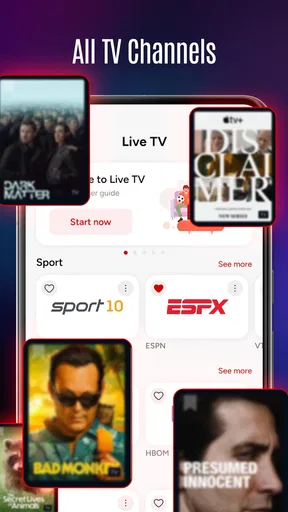

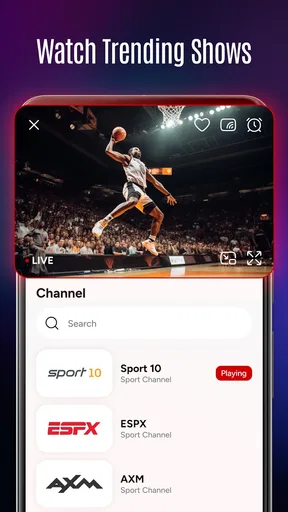
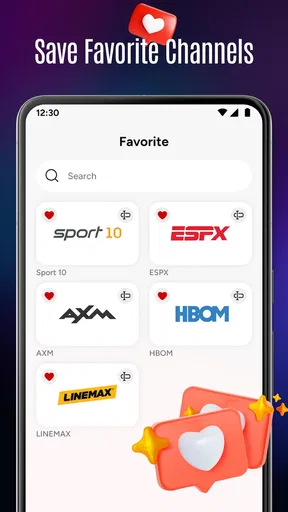
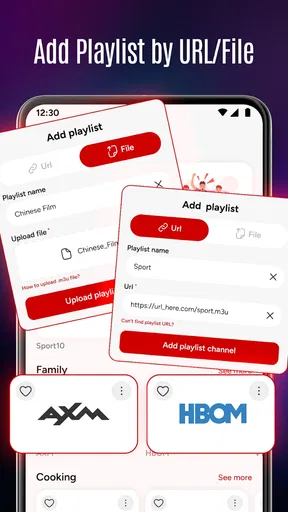
 Analysis by AppCompare
On a shared household device, the biggest question is often not which film to watch but how to get from “we have ten minutes” to something everyone can agree on. Live TV: Movies and TV Shows is aimed at that kind of casual viewing: a video app from MEIVI Company Limited that brings live television and on-demand entertainment into one place. I’d treat it as a convenient starting point for browsing, rather than assume it will replace every streaming service or the television guide your household already uses.
When a shared screen needs a quick choice
Picture a quiet evening when one person wants the background company of a live channel while another is deciding whether to settle in for a movie. Having both kinds of viewing in one app can make that handoff feel simpler than jumping between a broadcaster’s app and a separate on-demand service. The practical benefit is not necessarily finding a specific title instantly; it is having a single place to begin looking.
That makes the app most appealing to people who browse with an open mind, enjoy channel surfing, or want a casual option on a phone or tablet. If your household already has a very particular show in mind, a dedicated service with a clearly searchable catalogue may be a quicker route. I would keep that distinction in mind: convenience for browsing is different from guaranteed access to a particular programme.
Agree on boundaries before passing the device around
When several people use the same screen, it helps to decide whose viewing preferences should shape what appears next. A recommendation system can be useful when one person watches consistently, but shared use may mix different tastes and make suggestions less personal. If recommendations start feeling off-target, a simple household habit—using the app mainly for shared viewing, rather than expecting it to reflect each person separately—can prevent disappointment.
Watchlists can also become a small coordination tool. I’d use one as a shared shortlist of things to consider, not as a promise that everyone will want to watch every item. Agreeing that a title is “for later” rather than “next” keeps a useful list from turning into an unspoken queue. For a household with very different schedules, jotting down a title outside the app may be more reliable if everyone needs to know why it was saved.
Before settling into a long viewing session, it is worth checking that the chosen content is available to you at that moment and that the network is behaving well. Live viewing and on-demand playback have different rhythms: a live channel gives you what is on now, while a movie or series lets you choose when to begin. If a programme matters to the group, deciding which format suits the occasion can avoid the familiar “we missed the start” or “we can’t agree on an episode” snag.
Practical trade-offs compared with other video apps
Compared with using a traditional TV guide alone, a combined live-and-on-demand app can be more flexible when the household wants to move between scheduled viewing and something chosen deliberately. Compared with a subscription service centred on a specific library, it is better approached as a broad browsing option than as a guaranteed home for a particular film or series. Those are different jobs, and I would not choose one expecting it to do the other equally well.
Worth Reading Before You Choose

EA SPORTS FC Mobile 26 Is a Bigger Football Game, but It Takes Time

Flipboard Shows What News Apps Must Do Beyond the Feed

Switching to Android Auto Means Rethinking Your Driving Routine

Google Calendar Makes a Crowded Week Easier to Manage

Ludo King Makes the Most of the Minutes Between Plans

Baby Panda World Brings Quick Play to Modern Phones, but Its Game Library Feels Busy
Live channels also bring a trade-off that is easy to overlook: the household gives up some control over timing and, as the original viewing experience notes, some channels may include advertising. If interruptions are a deal-breaker, on-demand viewing or another service with an experience better suited to uninterrupted watching may fit the occasion more comfortably. On the other hand, a live channel can make a shared room feel less like everyone is negotiating a playlist and more like people are casually watching together.
For a less frustrating session, I’d first browse briefly, choose a channel or title, and then put the device down instead of letting the group scroll indefinitely. If you are on a limited or inconsistent connection, the original experience also notes that quality settings can be adjusted; trying a more modest setting is a sensible trade-off when smooth playback matters more than maximum sharpness. I would test this before guests arrive or before a programme the group is eager to see, rather than troubleshoot in the middle of it.
Age, trust, and expectations in a family setting
The app has an Everyone content rating, which is a useful general age label, but I would not treat that as a guarantee that every individual film, show, or live broadcast will suit every child or household. Parents and caregivers should still make the viewing choice themselves, especially when children are sharing a device with adults. A quick look at what is on before handing over the screen is a more dependable approach than assuming a broad app-level rating answers every content question.
Likewise, shared-device use works best when the family is clear about what is being watched and who is choosing. I would not assume that a common screen automatically means separate viewing histories, profiles, or household controls. If those boundaries matter to you, choose a service whose account and supervision tools are clearly suited to your needs. That is particularly important when a device is used by both children and adults, or when one person wants personal recommendations that are not shaped by everyone else.
Who will get the most from it
I can see this working well for someone who wants an easy-to-try video option without paying upfront: it is free, has reached over one million installs, and holds an average rating of 4.2 from around 9,100 ratings. Those figures suggest that people are giving it a real try, but they do not tell me whether its particular channel selection or viewing style matches your household. The app is rated for Everyone, and its current release is version 1.0.1, so I would keep expectations practical and judge it by the content and playback you actually encounter.
It is less suited to viewers who need a specific catalogue, dependable access while travelling, or carefully separated profiles for several people. Regional availability can affect what you can watch, and shared recommendations may not reflect each person’s preferences. If any of those points is essential, a specialist streaming service or a broadcaster’s own app may be the better primary choice, with this one serving as a secondary place to browse.
First Impressions
Right off the bat, Live TV: Movies and TV Shows impressed me with its sleek and minimalistic interface. The app is super easy to navigate, which is a huge plus if you’re like me and don’t want to spend ages figuring out how to use a new app. It’s all about getting you quickly to the content you want, which is exactly what I was hoping for.
Features Galore
One of the coolest features is the ability to stream both live TV and on-demand movies and shows. You can switch between live broadcasts and your favorite series with just a tap. The app also offers a personalized recommendation system that, over time, gets better at suggesting content you’ll actually enjoy. It feels like the app just gets me!
And let’s talk about video quality. The streaming is smooth as butter, with hardly any buffering, which is a huge relief. Plus, you can adjust the quality settings depending on your internet connection. This flexibility is seriously underrated.
Content Library
The content library is pretty extensive. From the latest blockbusters to classic TV shows, there’s a little something for everyone. I loved finding hidden gems that I didn’t even know I was missing out on. You can also create watchlists, so you never forget what you wanted to watch next. Trust me, this is a lifesaver for those of us with memory like a sieve.
User Experience
The user experience is top-notch. Everything feels intuitive, and the app is responsive, which makes browsing a breeze. I find myself using it way more than I thought I would. It’s like having a personal entertainment center right in my pocket. The app also supports multiple devices, so you can start a movie on your phone and finish it on your tablet or smart TV. How cool is that?
What Could Be Better?
Now, nothing is perfect, right? While the app is fantastic, there are a few areas for improvement. Occasionally, some content is region-locked, which can be a bit of a bummer if you’re traveling. Also, while the app is mostly ad-free, some live channels do have ads, which might interrupt the experience a bit. But hey, it’s a small price to pay for all the content you’re getting.
Those limitations matter most when plans are specific. If someone has promised the household a particular programme, check its availability before everyone gathers, especially if you are away from your usual location. For a relaxed evening, an unexpected regional restriction is merely annoying; for a planned watch, it can derail the whole choice. I would keep a backup option in mind rather than assume every title or channel will travel with you.
A few useful ways to make viewing smoother
For a family movie night, I’d let each person suggest one possibility, add the finalists to a watchlist, then make the actual choice together. That gives the list a clear purpose and avoids treating recommendations as a substitute for conversation. It also helps keep the app’s personalised suggestions from becoming the only influence on what the group watches.
For background viewing while cooking or doing chores, a live channel may be more convenient than repeatedly choosing episodes. For focused watching, on-demand content gives you control over when to start and stop. Switching between those modes according to the activity is a small but useful way to make the combined format earn its place, rather than opening the app and browsing without a plan.
If playback becomes uneven, I’d check the connection and try the available quality adjustment before concluding that the app itself is unusable. A lower setting can be a reasonable choice on a busy household network, particularly if other people are working or studying online at the same time. Conversely, when the connection is stable and the picture is important, there is little reason to compromise in advance. The right setting depends on the room, the network, and whether smooth playback or image detail matters more at that moment.
Device sharing and everyday expectations
Using the app across devices can make it easier to move viewing from a phone to a larger screen, but it is still worth treating each device as part of the household routine rather than assuming every transition will be seamless in every situation. If someone is watching on a phone while another person wants the living-room screen, agree on where the shared session belongs before handing the device over. That avoids confusing a personal watch with something everyone considers communal.
For households that rotate devices among adults, the simplest boundary may be practical rather than technical: decide which watchlist is shared, and avoid relying on one person’s recommendations as a neutral guide for everyone. That is especially helpful when tastes vary sharply. A recommendation that makes sense after one person’s movie night may be a poor fit for a child choosing the next programme, so a brief adult check remains sensible.
The app is free, which lowers the barrier to trying it, but free access does not automatically make it the best answer for every viewing need. If you want a narrowly curated catalogue, polished account separation, or predictable access to a particular title, another service may be worth using alongside it. If you mainly want a low-commitment way to browse live viewing and on-demand entertainment, this app’s mix is more compelling.
The Final Verdict
So, is Live TV: Movies and TV Shows worth your time? Absolutely! It’s packed with features that make watching TV and movies a pleasure rather than a chore. Whether you’re a movie buff, a TV show fanatic, or just someone who wants a reliable way to catch up on your favorite content, this app has got you covered.
With its user-friendly interface, vast content library, and seamless streaming capabilities, it’s hard not to fall in love with it. So go ahead, give it a whirl, and transform your viewing experience. You might just wonder how you ever lived without it!
My household verdict
For a shared home, I’d see it as a useful extra screen for relaxed browsing, quick live viewing, and keeping a shortlist of things to watch together. Its strongest case is convenience: one place to explore more than one viewing style, without an upfront price. Its weaker case is precision. A household that depends on strict profile boundaries, child-specific controls, or guaranteed access to a named programme should look for those needs in a service built to meet them.
Overall, I’d give it a try if your aim is casual entertainment and you are comfortable checking what is available before planning around it. The 4.2 average rating and broad install base make it an established choice for people exploring this kind of app, while the practical details of your own connection, location, and household habits will matter more than any general impression. Used with sensible expectations, it can make a shared device feel like a handy little viewing hub rather than another place to scroll without deciding.
Pros
- Extensive library of movies and shows.
- High-quality streaming with minimal buffering.
- User-friendly interface for easy navigation.
- Regular updates with new content.
- Option to download for offline viewing.
Cons
- Requires a stable internet connection.
- Contains in-app advertisements.
- Limited availability of some live channels.
- Subscription needed for premium content.
- No parental controls for child safety.
FAQs for Live TV: Movies and TV Shows
What types of content can I watch on Live TV: Movies and TV Shows?
Live TV: Movies and TV Shows offers a diverse range of content, including popular movies, trending TV shows, live sports events, and news broadcasts. The app frequently updates its library, ensuring users have access to the latest releases and classic favorites across multiple genres.
Is Live TV: Movies and TV Shows free to use?
The app offers both free and premium versions. The free version provides access to a limited selection of content with ads. For a more comprehensive library and an ad-free experience, users can opt for the premium subscription, which usually comes with a monthly or annual fee.
Can I download content for offline viewing?
Yes, the app allows users to download select movies and TV shows for offline viewing. This feature is particularly useful for watching content on the go without an internet connection. However, availability of downloadable content may vary based on licensing agreements.
Is Live TV: Movies and TV Shows compatible with all devices?
The app is designed to be compatible with most Android and iOS devices. It supports smartphones, tablets, and some smart TVs. However, it's recommended to check the app's system requirements on the app store to ensure compatibility with your specific device model and OS version.
Does Live TV: Movies and TV Shows offer parental controls?
Yes, the app includes parental control features to help manage and restrict content access for younger viewers. Parents can set age-appropriate restrictions and create individual profiles, ensuring a safe and suitable viewing experience for all family members.


